A free recipe editor for plain-text recipes, with CookBot built in.
Write and organise your .cook files, build meal plans and shopping lists, set targets — and let CookBot plan the week against them, across your whole collection. Every change is listed in the chat, one click to undo.
- Protein 31%
- Fat 28%
- Carbs 41%
Reports that judge the week
Render any recipe or a whole .menu plan through a template: macros, calories per person per day, allergens with sources, cost. Define targets — say, 35% protein — and the report checks the plan against them. Standard templates run on your own data for free; the hosted nutrition functions come with Cook Basic and Cook Pro.
CookBot, built in
The AI assistant lives in a sidebar. It pulls in recipes and menus from your collection to answer questions, imports recipes from URLs, and drafts meal plans — then closes the loop: when a report shows the week missing your targets, CookBot adjusts the plan until the check passes. Every file it writes is listed in the chat, one click to undo. Included with Cook Pro.
- Your files stay on your disk. CookBot only reads what you choose to share in the conversation — never your full collection.
- Every change is one click to undo. CookBot lists each file it edits in the chat, with the diff.
- Open source. The editor and the CookBot integration are public on GitHub — inspect how prompts and files are handled.
Whatever you’re aiming for.

Write in plain Cooklang
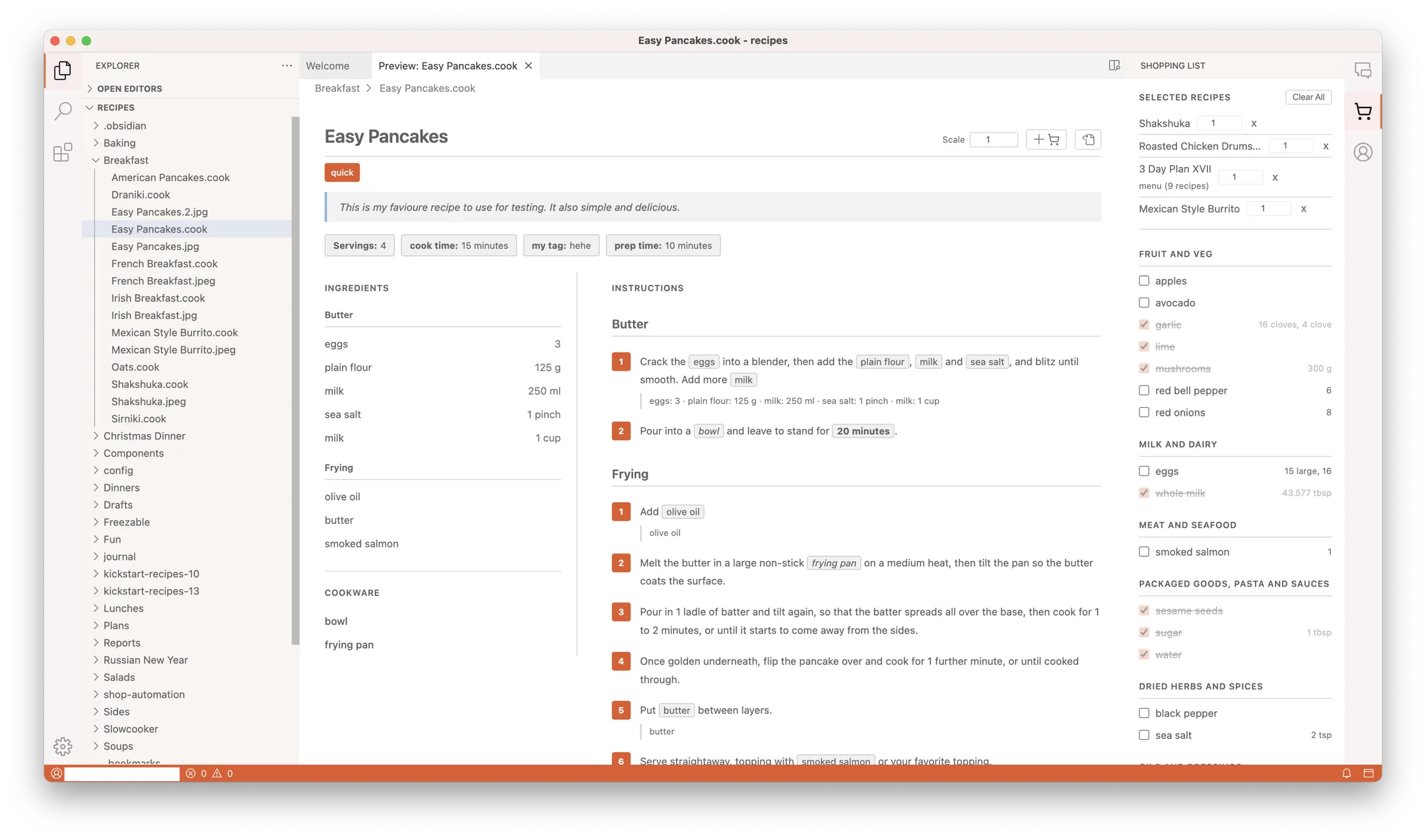
Syntax highlighting, inline validation, and autocomplete for ingredients
and cookware. Your recipes stay as .cook text files —
diffable, git-friendly, future-proof.
Beautiful preview. Shopping list included.
One click turns your .cook file into a scaled, chip-tagged recipe view.
Select multiple recipes and Cook Editor builds a combined shopping list,
grouped by aisle.

Meal plans in a single file
.menu files link recipes across days and meals. Scale by household size,
see the week at a glance, and let the shopping list flow from the plan.
servings: 2
time: 25 min
Preheat the #oven{180°C}
Mix @flour{200%g} with
@eggs{3} and
@whole milk{250%ml}.
Bake for ~{25%minutes}.
Plain text files. Yours forever.
Every recipe and menu is a text file on your disk. No database. No lock-in. Readable in any editor in fifty years.
-
Built inShopping ListAisle-grouped lists from recipes and menus, minus what’s in your pantry.
-
Built inRecipe HubSearch the public Cooklang recipe index and save any recipe to your Drafts.
-
InstallPantryStock levels, low and out-of-stock items, expiry dates — edited without touching the file.
-
InstallNutri-ScoreA Nutri-Score badge on every recipe preview. Needs Cook Basic or Pro.
-
InstallAllergensFlags the allergens you choose on recipe previews.
-
InstallMeal JournalA daily meal journal in Cooklang — and a starter for plugin authors.
Add the features you want
Open the Extensions view, pick a plugin from plugins.cook.md, click Install. It’s active straight away — new panels, buttons in the recipe preview, badges, commands. Don’t need one? Disable it; your files are untouched.
Shopping List and Recipe Hub come with the editor, built on exactly the same API as everyone else’s plugins.
Built to be extended.
Cook Editor runs on the VS Code extension engine — so it bends to how you work.
Write a plugin in an afternoon
Plugins are VS Code extensions plus a small Cooklang API — read parsed recipes, scale them, add buttons to the recipe preview. Publish to plugins.cook.md with the usual ovsx tooling. It’s early days, and we’re looking for the first authors.
Your templates, your metrics
Reports are plain Jinja templates — write your own for cost breakdowns, recipe cards, CSV exports, or point them at your own local nutrition datastore. Right-click a .cook file, pick a template, done.
Edit on your laptop.
Cook from your phone.
Cook Editor plays nicely with the Cooklang apps for iPhone and Android. Your collection and shopping list stay in sync, so you can tick items off at the store while someone else preps at home.
Sync runs on our servers and comes with Cook Basic or Pro — the editor itself is free.


Simple pricing.
Cook Editor
- The editor & mobile apps — free
- Recipe preview and scaling
- Shopping lists by aisle
-
.menumeal plans - Recipe import from any recipe site
Cook Pro
Founding cooks — 23 spots left, price locked while you stay subscribed.
7-day free trial. Cancel anytime. Pay monthly — no annual lock-in.
- Everything in Cook Basic — sync across devices, batch import from other apps, nutrition in reports
- CookBot AI — plans your week from your recipes and pantry, edits across your library
- 28 CookBot conversations a month — a weekly plan plus daily adjustments
- Set protein or calorie targets — CookBot adjusts the plan until it hits them
- 200 recipe imports from photos and 200 from YouTube, TikTok and Instagram a month
Just want sync and imports, without CookBot? Cook Basic is €4.99/month. Compare plans →



 Cancel anytime
Things people ask before signing up
Where do my recipes go when I use CookBot?
.cook files stay on your local disk. When you ask CookBot a question, only the specific file content you reference is sent to the AI provider for processing — never your full collection. Cook MD doesn't store conversations on our servers, and what you send isn't used to train the AI provider's models. Every file CookBot changes is listed in the chat with its diff, and one click undoes it.
Can I cancel anytime?
How do I pay? Which cards work?
Why a subscription for a desktop app?
What happens to my recipes if I stop paying?
.cook and .menu files are plain text on your disk — they keep working in any text editor, in Cook Editor itself, and on the mobile apps. You only lose what runs on our servers — sync, photo and social imports, nutrition data and CookBot.
Get Cook Editor
macOS
Apple Silicon
.dmg ↓
Windows
x86_64 installer
.exe installer ↓
Linux
x86_64 AppImage
AppImage ↓
Intel Mac · Linux .deb · All releases
Windows may warn that the app is unrecognised — choose More info → Run anyway. Why?